Type & Field Inheritance
This article describes the exact inheritance rules for work item types, document types, link types, iteration types, and change request types — and for the custom fields they carry. For the overall model, start with Configuration Inheritance.
All four kinds of types follow the same principle: a type redefined at a lower tier patches the inherited definition rather than replacing it. You only state what differs; everything else continues to flow down.
Inherited, customized, local
A type tab in workarea Settings shows three kinds of entries:
| Entry | Appearance | What you can do |
|---|---|---|
| Inherited | Inherited badge, read-only | Customize — creates a local override |
| Customized | Editable, no badge | Edit the local override, or Remove local override to return to the pure inherited definition |
| Local | Editable, no badge | Edit or delete — this type exists only in this workarea |
Deleting is only possible for the local layer. An inherited type can be customized but never removed from below — that guarantee is what makes group- and global-level standardization trustworthy.
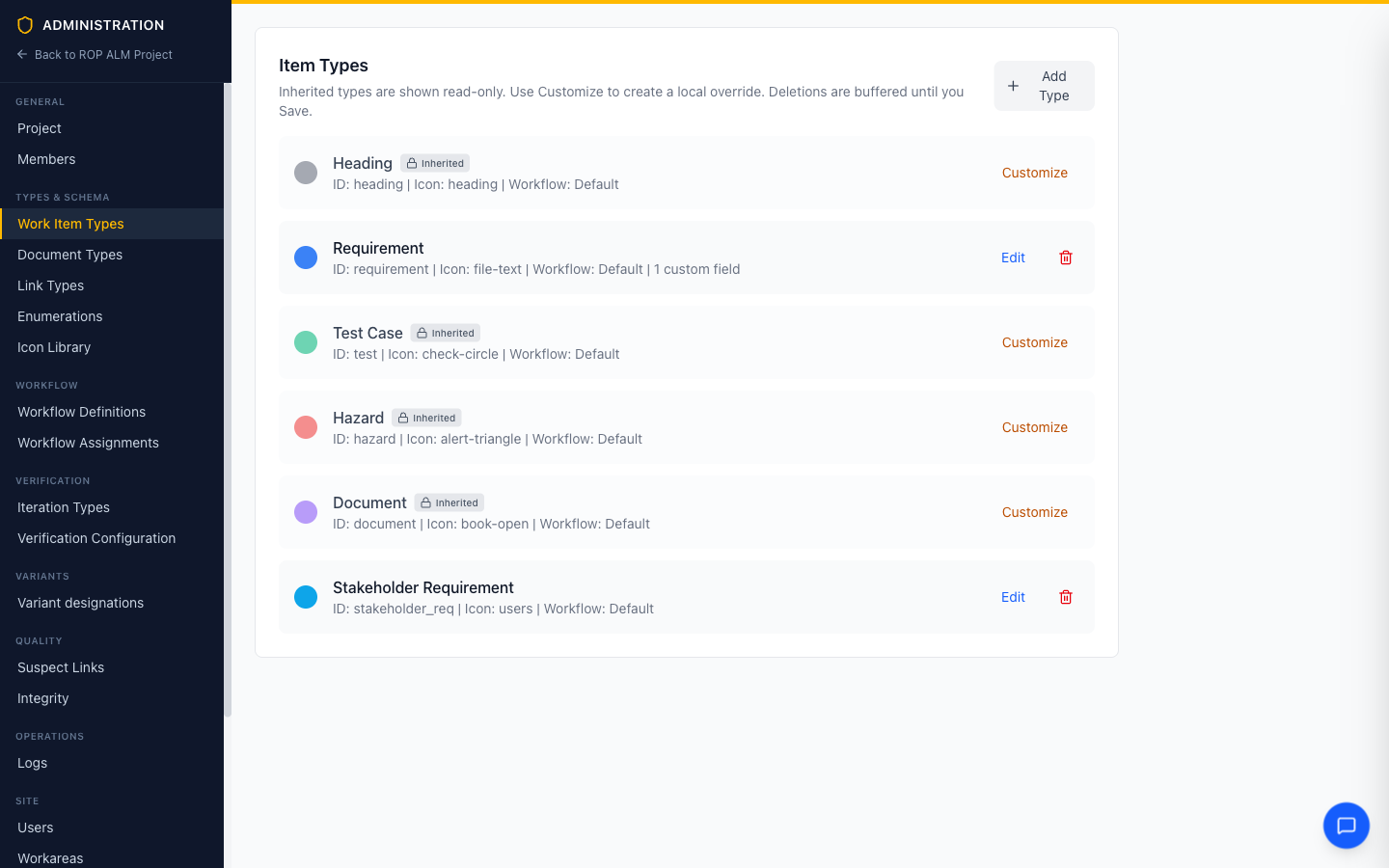 Heading, Description, Technical Requirement, Design Requirement, Test Case, and Issue are inherited unchanged. System Requirement is customized locally (one custom field added). Stakeholder Requirement is purely local.
Property-level patching
When you customize an inherited type, every basic property — label, color, icon, workflow — is independent:
- A property you set locally wins.
- A property you leave empty keeps coming from the parent — including future changes to the parent.
In the editor for a customized type, empty inputs literally mean “inherit”. For example, customizing the global requirement type to add a field but leaving Label, Color, and Icon blank means a later global rename from “Requirement” to “System Requirement” flows straight into your workarea.
Custom fields: merge by key
Fields are merged by field key, tier by tier:
- A locally added field with a new key is appended to the inherited fields.
- A locally defined field with the same key as an inherited one replaces that field’s entire definition (label, type, required flag, …) — use this to, say, make an optional inherited field required locally.
- All other inherited fields pass through untouched.
The field editor makes the split visible — inherited fields are shown read-only, local fields are editable:
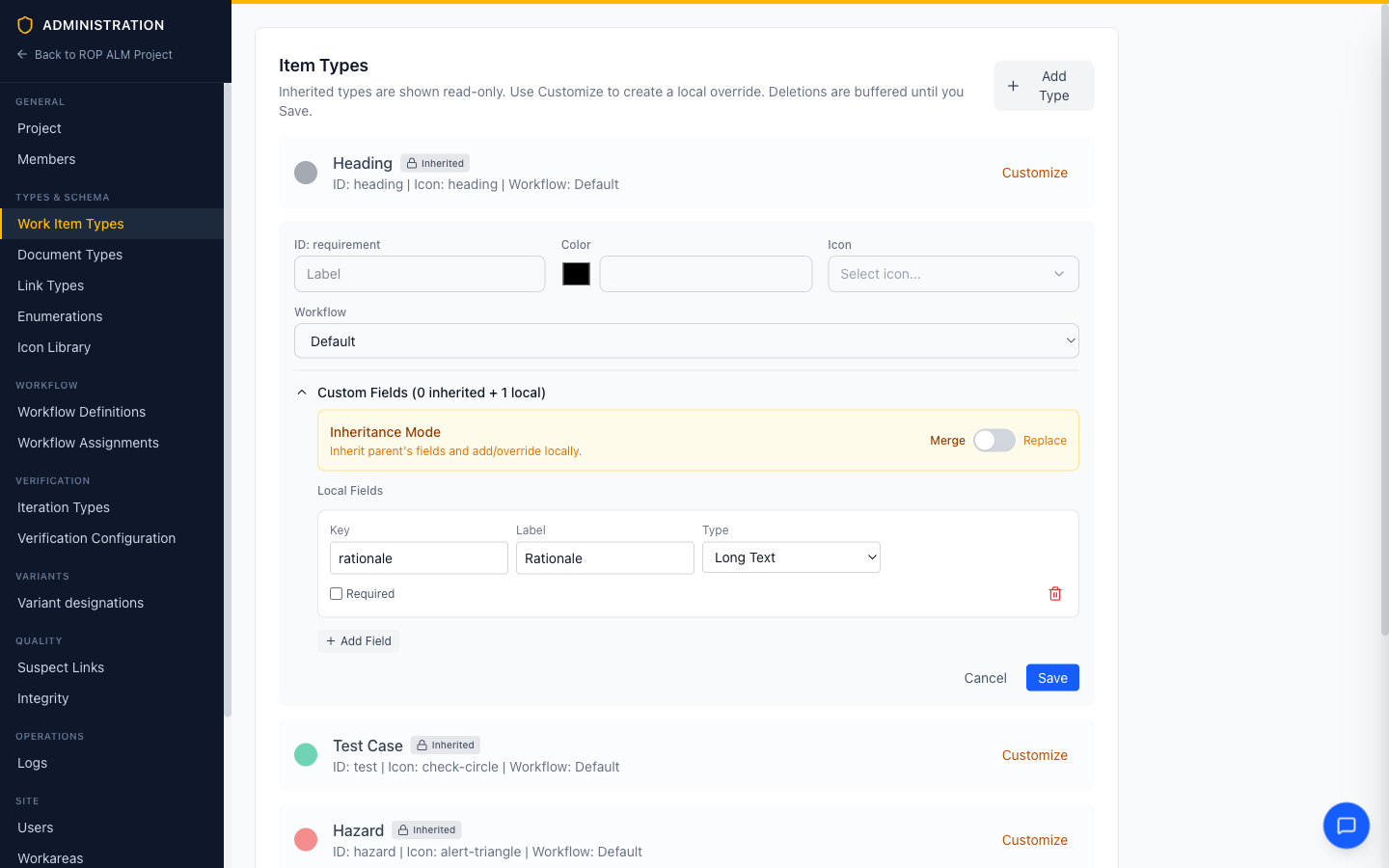 Customizing the inherited System Requirement type: fields are in Merge mode, and one local field (Rationale) is added on top of whatever is inherited.
Merge vs. Replace
The Inheritance Mode switch in the fields section chooses between two strategies:
| Mode | Behavior |
|---|---|
| Merge (default) | Inherited fields + local fields, merged by key as described above |
| Replace | The local field list replaces the inherited fields entirely. Inherited fields disappear for this type in this workarea. |
Replace is the escape hatch for the rare case where a parent type’s fields genuinely don’t fit. Prefer Merge — with Replace, parent-level field improvements no longer reach you.
Example
Global defines requirement with fields verification_method and source. The Automotive group customizes it, adding asil. A workarea in that group adds rationale and redefines source as required:
| Tier | Fields stated | Resolved result in the workarea |
|---|---|---|
| Global | verification_method, source | |
| Group | asil | |
| Workarea | rationale, source (required) | verification_method, asil, rationale, source (required) |
Kind-specific rules
A few properties are lists that don’t merge element-by-element — if a lower tier states them at all, its value wins wholesale:
- Document types — Allowed item types. The list of item types permitted in a document replaces the inherited list when set locally. Leave it unset to inherit.
- Link types — Rules. A link type’s source/target rule list replaces the inherited rules when set locally. The
source,target,label, andreverse labelproperties patch individually, like any scalar. - Workflow assignment. The
workflowa type points at is a single property and follows normal patching: set it locally to assign a different workflow to that type in this workarea only. (The workflow definitions themselves follow different rules — see Workflow & Policy Inheritance.) - Changing an entity’s type. Because a type selects the workflow, changing a work item’s, document’s, iteration’s or change request’s type may swap its workflow mid-life. The rule is the same everywhere: the current status is kept when the new workflow has a status of the same name, otherwise the entity moves to the new workflow’s initial status and the move is recorded in its status history. Edits made on a change request branch follow the same rule at edit time; what the branch holds is what merges.
Practical guidance
- Put a type at the highest tier where it is genuinely shared. If two groups both need it, it belongs in global; if only one program needs it, keep it in the workarea.
- Customize narrowly. Set only the properties you actually want to differ. Every property you set locally is one the parent can no longer manage for you.
- Audit overrides occasionally. Remove local override is cheap and instantly returns the type to the inherited standard — use it when a local customization has outlived its reason.