Bulk Operations
Select multiple items to perform operations in bulk — delete, export, or transition statuses all at once.
Selecting Items
- Click the checkbox on each row to select individual items
- Shift+click a checkbox to select a range
- Use the header checkbox to select or deselect everything at once
- Ctrl/Cmd+A (while the table has focus) selects all loaded rows
- Escape deselects all
A “N SELECTED” badge appears at the top-left of the table, and the status strip at the bottom shows the count too. Changing the type/status filter or the search clears the selection.
Note: Selection is unavailable while viewing a baseline — the list is read-only there.
Bulk Action Bar
When one or more items are selected, a floating action bar appears at the bottom of the screen:
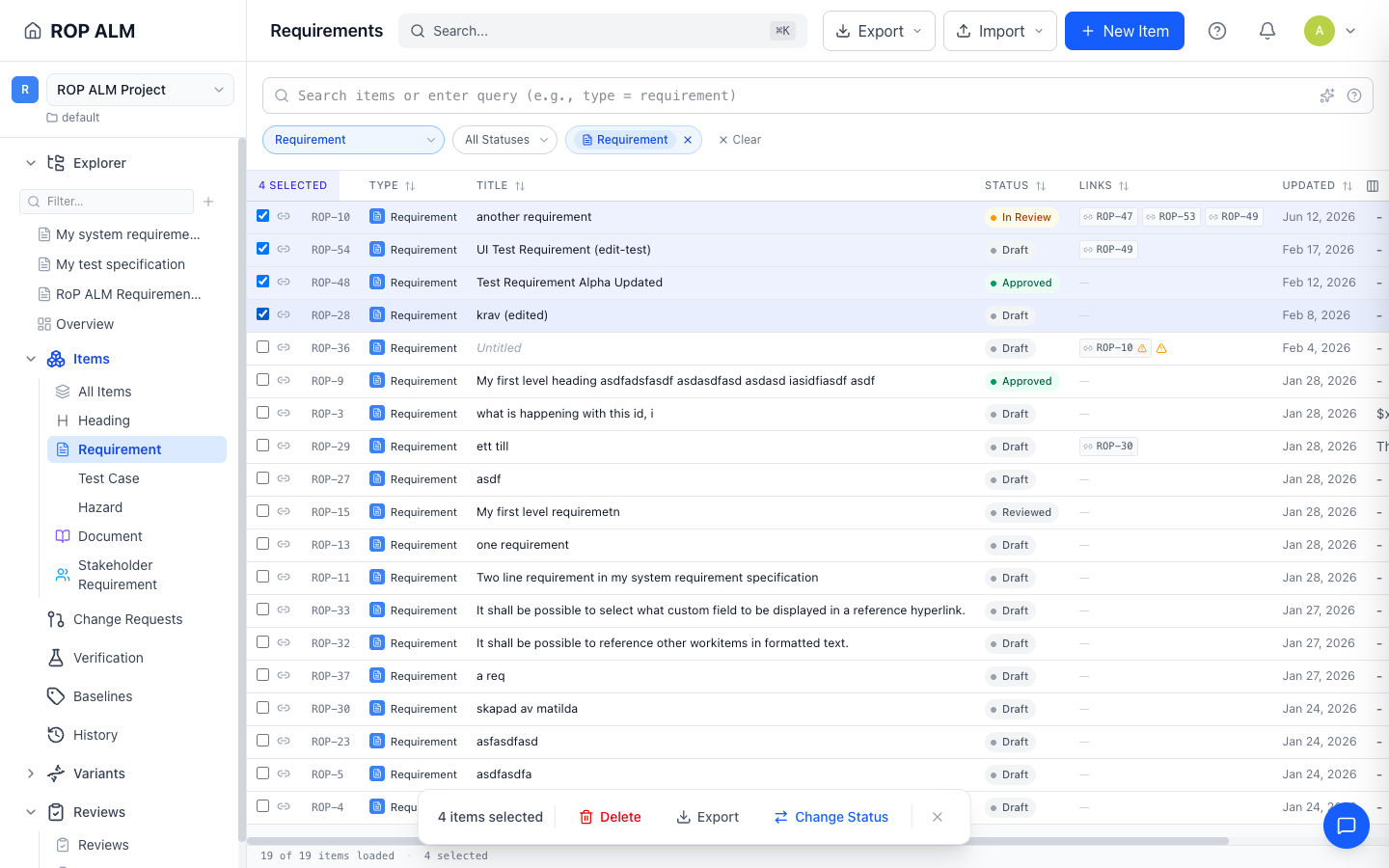
| Action | Description |
|---|---|
| Delete | Delete all selected items, after a “This action cannot be undone” confirmation |
| Export | Export the selected items to Excel |
| Change Status | Apply a workflow transition to all selected items |
| × | Clear the selection |
In baseline mode only Export is shown.
Bulk Status Transitions
- Select the items you want to transition
- Click Change Status in the bulk action bar
- The dialog shows transitions that are common to all selected items (or “No common transitions available”)
- Select a transition and provide any required inputs, then click Apply to N items
- A progress bar tracks execution, counting successes and failures
- If some items fail, they are listed with their errors and a Retry Failed button lets you retry just those
Context Menu
Right-click an item row to open a context menu. Right-clicking an unselected row first selects just that row.
Single item:
- Open, Edit, Duplicate, Change Status, Delete
Multiple items selected:
- Change Status, Export Selected, Delete Selected, Deselect All
Keyboard Shortcuts
These work while the table has keyboard focus:
| Key | Action |
|---|---|
| ↑ / ↓ | Move row focus |
| Space | Toggle selection on the focused row |
| Enter | Open the focused item’s detail page |
| Ctrl/Cmd+A | Select all loaded rows |
| Escape | Deselect all |
| Delete / Backspace | Delete selected items (opens the confirmation dialog) |